

A bank statement can tell a lender a great deal about how an applicant manages money. It may show regular salary credits, customer receipts, household or business expenses, loan repayments and changes in cash flow. The challenge is making sense of those details quickly and consistently, especially when a credit team is handling many applications.
That is why banks and NBFCs use bank
statement analyser software as part of loan assessment. The right solution does
more than copy figures from a PDF. It helps the team organize transaction data,
identify patterns and decide which entries need a closer look. This guide
explains what to compare when choosing bank statement analysis software in
India and how to test whether it fits your lending process.
What is bank statement analyser software?
Bank statement analyser software extracts transaction information from a statement and presents it in a structured format. Depending on the product, it may also categorize transactions, identify recurring payments, summarize cash flow and flag entries that deserve review.
Consider a small business owner applying for working capital. The account may contain customer payments, transfers to suppliers, salaries, rent, loan instalments, refunds and cash deposits. A closing balance alone cannot explain the business’s financial position. A credit officer needs to understand what those transactions represent and how they fit with the information in the application.
A bank statement analyzer can make that review more organized. It can reduce the need to inspect every line manually and help teams apply a more consistent process across applicants and bank formats. The quality of the analysis still depends on how well the software handles the documents and transaction descriptions it receives.
PDF parsing is not the same as bank statement analysis
PDF parsing is the first step. It captures fields such as dates, descriptions, debit and credit amounts, and balances. That can save time compared with typing information into a spreadsheet, but extraction by itself does not explain what the transactions mean.
Imagine a statement with ₹5 lakh in credits during one month. That total could include customer payments, a transfer from another account owned by the applicant, a refund and a loan disbursement. Counting every credit as business income would overstate earnings and could give the lender a misleading picture.
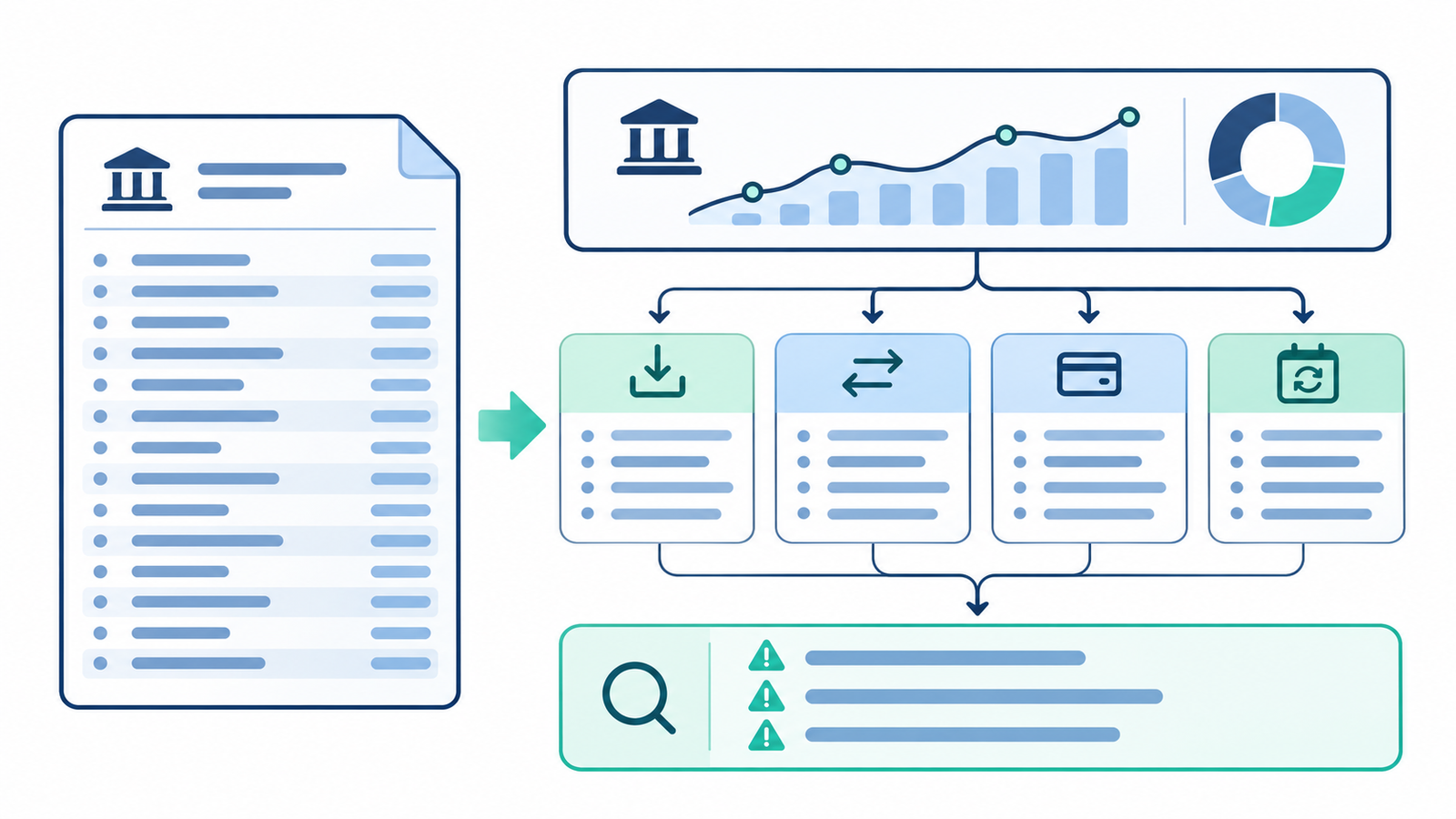
Deeper bank statement analysis looks for context and patterns over time. It can help separate regular receipts from internal transfers, identify recurring loan payments, summarize inflows and outflows, and bring unusual deposits or withdrawals to a reviewer’s attention. In short, extraction shows what is written in the statement; analysis helps a credit team interpret the financial activity behind it.
Features to compare in bank statement analysis software
A polished demonstration does not always reflect day-to-day performance. Ask providers to show how their software handles the kinds of statements, applicants and exceptions your team sees in actual loan processing.
1. Transaction classification and income identification
Not every credit is income, and not every debit is an operating expense. A statement can include salary, customer receipts, supplier transfers, refunds, loan disbursements and transfers between the applicant’s own accounts. The software should help place transactions into useful categories and distinguish earnings from money that has simply moved between accounts.
This matters particularly for self-employed applicants and small businesses, where payment descriptions can vary from one bank or customer to another. Check how the product handles unfamiliar descriptions, how uncertain classifications are shown and whether a reviewer can verify the result against the original entry.
2 . Recurring EMIs and existing obligations
Existing repayments affect an applicant’s available repayment capacity. Home, vehicle, personal and business loan instalments may appear under abbreviated lender names, payment references or other descriptions that are not immediately recognizable. A useful analyser should help identify recurring repayment patterns and surface relevant issues, such as missed or returned payments, for review.
3. Cash flow analysis
A month-end balance can hide what happened during the rest of the month. A business may receive most customer payments early, then use the funds for salaries, suppliers, rent and loan instalments. Looking only at the closing balance misses the timing and pressure points in that cash flow.
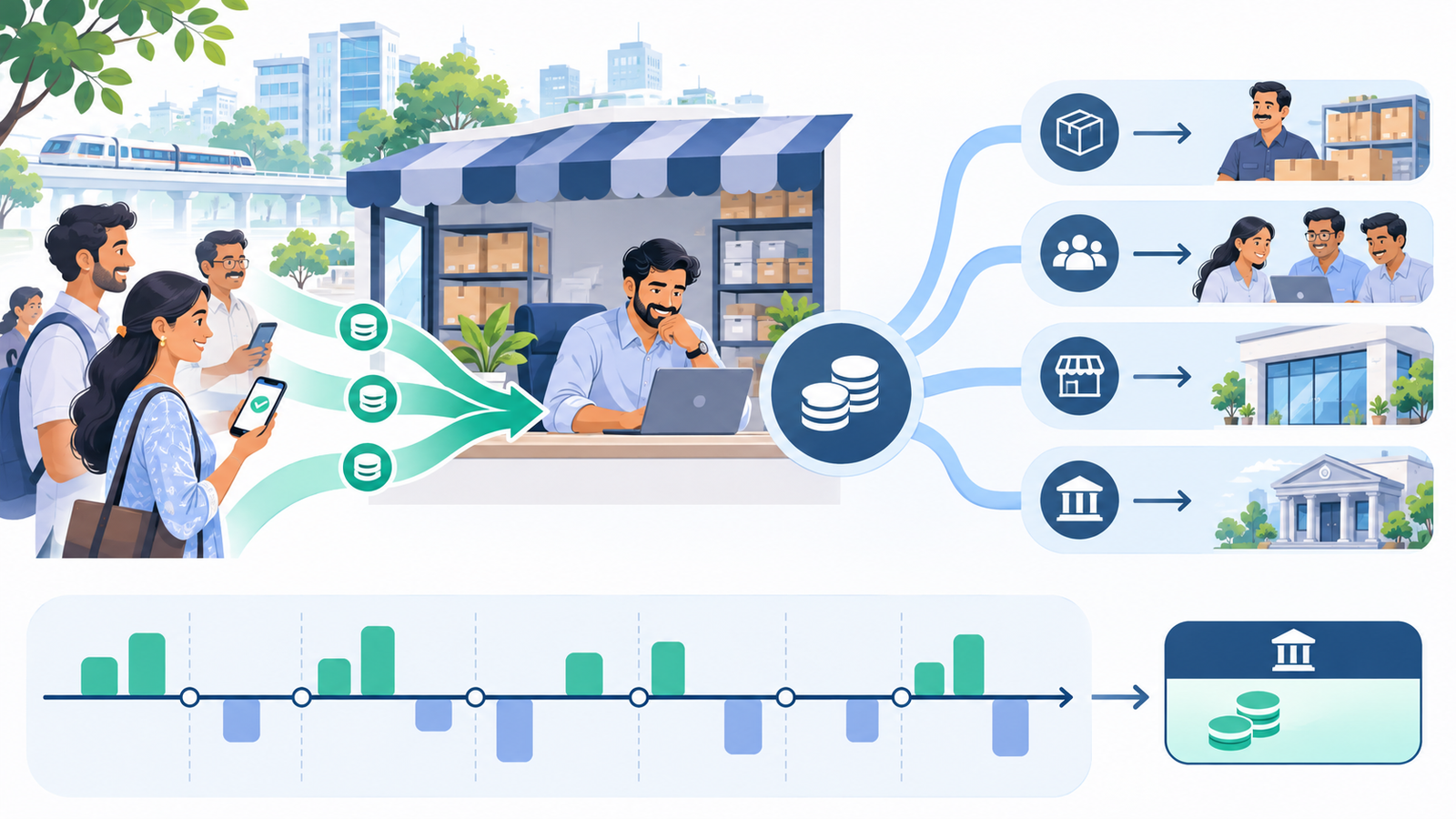
Cash flow analysis helps lenders review inflows, outflows, average balances and the regularity of account activity over a chosen period. These details give the credit team a fuller view than a single balance or total credit figure.
4. Document and transaction risk indicators
Lenders need confidence in the documents used during assessment. A solution may help flag possible alterations, inconsistencies or transaction activity that does not align with declared information. The reviewer should be able to see what triggered a flag and inspect the relevant source details.
A flag is not a conclusion that fraud has occurred. It is a signal that the document or transaction may need additional checks before the lender proceeds.
5. Explainability and audit trails
When software identifies an income figure or highlights a transaction, a credit officer should be able to trace the observation to the source statement. Source references, clear explanations and audit records make findings easier to verify and support a consistent lending process.

A 15-point checklist for banks and NBFCs
Use this checklist to compare products against your team’s practical requirements. Ask for evidence during a product evaluation rather than relying only on a feature list.
1.Bank and document coverage:Does it support the banks and statement formats commonly submitted by your applicants? Can it handle both digitally generated and scanned PDF statements?
2.Extraction quality:Are dates, descriptions, debit and credit amounts, and balances captured correctly? How are missing or unclear fields shown?
3.Processing capacity:Can it process long transaction histories, multiple accounts and the document volumes expected at your current and future scale?
4.Transaction classification:Can it group income, expenses, transfers and other relevant transaction types?
5.Income identification:Can it distinguish business or salary income from internal transfers, refunds and loan disbursements?
6.EMI detection:Can it identify recurring repayments and help surface existing financial commitments?
7.Cash flow analysis:Does it summarize inflows, outflows, average balances and income regularity in a way the credit team can use?
8.Risk indicators:Can it flag unusual activity or potential document inconsistencies and show why they were flagged?
9.Explainability:Can a reviewer trace an observation to the original transaction or document?
10.Integration:Can it connect with your existing loan origination system (LOS), loan management system (LMS) or other workflow through supported interfaces?
11.Data security:Are access controls, data handling and deployment options aligned with your security requirements?
12.Scalability:Can the platform support additional products, branches, users, applications and statement volumes?
13.Audit records:Does it keep suitable logs and records so reviewers can understand what was processed and reviewed?
14.Implementation support:What support is available for setup, integration, training, updates and technical issues?
15.Usability for credit teams:Can reviewers understand and validate the output without moving between too many screens or manually rebuilding the analysis?
Test the software with real sample statements
The checklist is a starting point. Before selecting a product, ask shortlisted providers to process sample statements that reflect your actual application mix. Include different banks, long transaction histories and scanned copies where text quality is less clear.
Compare the output with the original documents. Check whether the figures match, whether transactions are categorized sensibly and whether the result helps a credit officer make a better-informed assessment. Pay attention to how the software handles missing or uncertain information. Reviewers should be able to see when an item needs clarification rather than mistaking an incomplete result for a confirmed fact.
A practical evaluation should include both the credit team and the technology or security stakeholders who will support implementation. That helps surface workflow, integration and data-handling questions before a decision is made.
How CART supports bank statement analysis for lending
CART (Credit Assessment & Robotics Transformation) by Novel Patterns is a credit underwriting and bank statement analysis solution designed to help lenders organize financial information during loan assessment.
CART structures information from bank statements and other financial documents, then helps credit teams review transaction-level patterns such as income trends, business receipts, expenses, recurring payments and cash flow movements. These findings can be brought together to support a more organized review, including CAM-ready outputs for the lender’s assessment process.
Explainable findings and audit trails help reviewers check the information behind an observation. Integration options allow the solution to fit into existing lending workflows, and the platform is available for on-premises deployment for institutions with that requirement. As with any decision-support software, the lender remains responsible for validating the information and making the final credit decision.
Questions to ask during a product demonstration
Ask the provider to work with sample statements from your own lending context. Can the software process a statement with hundreds of transactions? How does it handle unfamiliar bank formats, unclear descriptions or scanned documents? Does every bank require a separate template?
Next, ask the provider to show how it separates income from transfers between an applicant’s own accounts. Ask it to demonstrate recurring EMI detection and cash flow analysis using the same statement. When the system flags an entry, check whether the reviewer can see the original transaction and understand the reason for the flag.
Cover the implementation details too: available integrations with your LOS or LMS, data security, user access, deployment options, processing capacity, implementation timeline and ongoing support. An end-to-end demonstration - from uploading a statement to reviewing the extracted information and assessment output - will give your team a much clearer sense of how the solution fits daily work.
Conclusion
A bank statement is more than a list of money coming in and going out. It can help a lender understand how an applicant earns, spends and manages existing financial commitments. Getting that picture takes more than extracting transactions: the team needs useful analysis, clear explanations and a way to verify findings against the original document.
When choosing bank statement analyser software in India, test the product with statements your team actually receives. Look closely at extraction quality, income identification, cash flow analysis, EMI detection, security, integration and the way the software handles uncertain information. The right solution should help credit teams spend less time rebuilding transaction data and more time evaluating the applicant’s financial position.